

CNC Remote for UCCNC
CNC Remote: your smartphone as a jog pendant for UCCNC
With the free STEPCRAFT CNC Remote app and the Bluetooth USB adapter, your smartphone becomes a wireless remote control for your CNC machine. You stand right where the machine needs you, instead of walking back and forth between computer and workpiece.
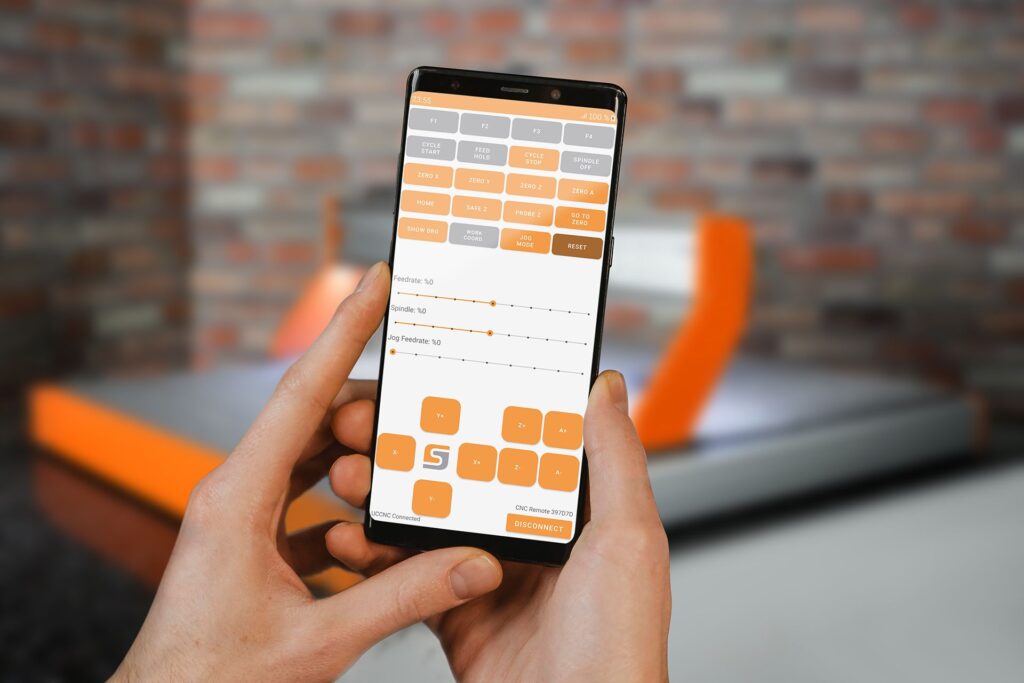
- Free app for iOS and Android
- Bluetooth Smart 5.0 USB adapter
- Up to 4 axes stepwise or continuously
- For all machines controlled by UCCNC
Functions
Everything a jog pendant does, on your smartphone
The CNC Remote app offers the functions of a conventional CNC jog pendant and works with all CNC machines controlled by the UCCNC control software.
Move the axes
Select and move up to four axes, stepwise or continuously, and see the active machine coordinates on the display.
Set zero points
Set zero points directly at the workpiece instead of at the computer.
Control the spindle
Switch the milling motor on and off and adjust the spindle speed.
Run programs
Start and stop the CNC program from your smartphone. An emergency stop button is integrated in the app.
Function buttons
Customise the function buttons to suit the way you work. On iOS, the app also offers a dark mode.
Bluetooth Smart 5.0
The adapter keeps your smartphone connected to the computer, wherever you stand at the machine.

At the machine
Set up the machine where the work happens
You no longer need to switch to the computer to adjust settings. Move to the workpiece, set the zero point and check the position, all from the smartphone in your hand.

Adapter
Plug in, pair, start
The CNC Remote Bluetooth USB adapter connects your smartphone to the UCCNC control software. Plug it into a free USB port on your computer, pair your smartphone and get started.
Setup
Turn your smartphone into a remote in four steps
- Get the adapter Order the CNC Remote Bluetooth USB adapter for UCCNC in the STEPCRAFT shop.
- Plug it in Insert the adapter into a free USB port on the computer that runs UCCNC.
- Download the app The STEPCRAFT CNC Remote app is free on the App Store and on Google Play.
- Pair and start Pair your smartphone with the adapter and control your machine from wherever you need to be.
Requirements
What you need
| Item | Requirement |
|---|---|
| Control software | UCCNC version 1.2111 or higher |
| Computer | Windows® 10 (32/64-bit) with a free USB port |
| Adapter | CNC Remote Bluetooth USB adapter for UCCNC (item no. 12477) |
| Smartphone | Android smartphone or iPhone with iOS 15.6 or later |
| App | STEPCRAFT CNC Remote, free; app language English |
Download the free app
The app is free. For wireless communication between your smartphone and UCCNC, you need the CNC Remote Bluetooth USB adapter.
FAQ
Frequently asked questions about CNC Remote
Not sure whether CNC Remote suits your machine? We are happy to help.
Is the app free?
Yes. The STEPCRAFT CNC Remote app is free to download. You also need the CNC Remote Bluetooth USB adapter, which connects the smartphone to UCCNC.
Which machines does CNC Remote work with?
With all CNC machines controlled by the UCCNC control software, not only with STEPCRAFT machines.
Does CNC Remote work with WinPC-NC?
No, the app works with UCCNC. For WinPC-NC, a wired handheld remote, the HR-10, is available.
Which smartphones are supported?
Android smartphones and iPhones with iOS 15.6 or later. The app language is English.
What does the app replace?
It replaces a conventional jog pendant: moving the axes, setting zero points, controlling the spindle and starting or stopping programs.
Is there an emergency stop?
Yes, the app has an integrated emergency stop button that stops the machine immediately. Keep the emergency stop switch on the machine within reach as well.
Control your CNC machine from your smartphone
Order the adapter, download the free app and get started. If you are still choosing your control software, compare WinPC-NC and UCCNC first.